

As a software developer, efficiently managing and resolving bugs is crucial to ensuring the quality and reliability of your projects. In 2025, the landscape of bug tracking tools continues to evolve, offering a diverse range of features designed to streamline the debugging process, enhance collaboration, and improve productivity.
Whether you’re part of a large team or working independently, choosing the right bug tracking tool can make all the difference in delivering polished, high-performing software.
In this blog article, we’ll explore the best bug tracking tools available for developers in 2025, helping you make an informed decision to elevate your development workflow.
What Are Bug Tracking Tools in Software Testing?
Bug tracking tools are essential applications used during software testing to identify, document, and manage bugs and issues encountered during the development process. Also known as issue tracking and defect tracking, bug tracking tools help teams maintain quality, improve productivity, and streamline the debugging process for overall improved software development.
Key Benefits of Bug Tracking Tools
Bug tracking tools are crucial for several reasons:
Improved Productivity
They help in efficiently managing and prioritizing bugs, allowing teams to focus on critical issues first.
Enhanced Collaboration
The best bug tracking software offer a centralized platform for software development teams, allowing developers, testers, and project managers to communicate and resolve issues.
Accountability
Assigning bugs to specific team members ensures that issues are promptly addressed.
Quality Assurance
Proper tracking of bugs ensures high-quality software quality and better user experience.
Key Elements of Bug Tracking Tools
When considering bug and issue tracking software, look for features like:
- Issue reporting with easy submission forms and detailed reporting options.
- Ability to categorize and prioritize issues.
- Collaboration features such as commenting systems, @mentions, and notifications.
- Integrations with other development tools like CI/CD systems, testing tools, and version control systems.
- Ability to tailor workflows to suit your team’s needs.
How to Choose the Best Bug Tracking Tool For Your Needs
Selecting the best bug and issue tracking tool depends on:
- Team Size and Structure: Ensure the tool scales with your team.
- Project Complexity: Choose a tool that can handle the complexity of your projects.
- User Interface: Look for tools with intuitive and easy-to-use interfaces.
- End Users: Consider if your end-users will be reporting bugs, or whether it’ll just be your internal team.
- Budget: Consider cost, but also the value the tool brings.
- Integration Needs: Ensure it works well with your existing tools and processes.
Learn more about choosing the best bug tracking tool for your business.
10 Best Bug Tracking Tools in 2025 for Software Developers
01. Userback
Userback is a powerful bug tracking tool designed for modern development teams. It offers real-time feedback and visual bug reports, making it easier for teams to spot and resolve bugs quickly. Userback stands out as the best bug tracking tool due to its ability to capture annotated screenshots and even session replays, which provide clear, contextual insights into issues, substantially simplifying the debugging process. The platform supports seamless integration with popular project management and collaboration tools like Jira, Trello, and Slack, ensuring that bug reports and user feedback are effortlessly incorporated into your existing workflows.
Key Features:
- Visual bug reports with screenshots and annotations
- Real-time collaboration and feedback
- Integration with popular tools like Jira, Trello, and Slack
- Customizable workflows
- User-friendly interface
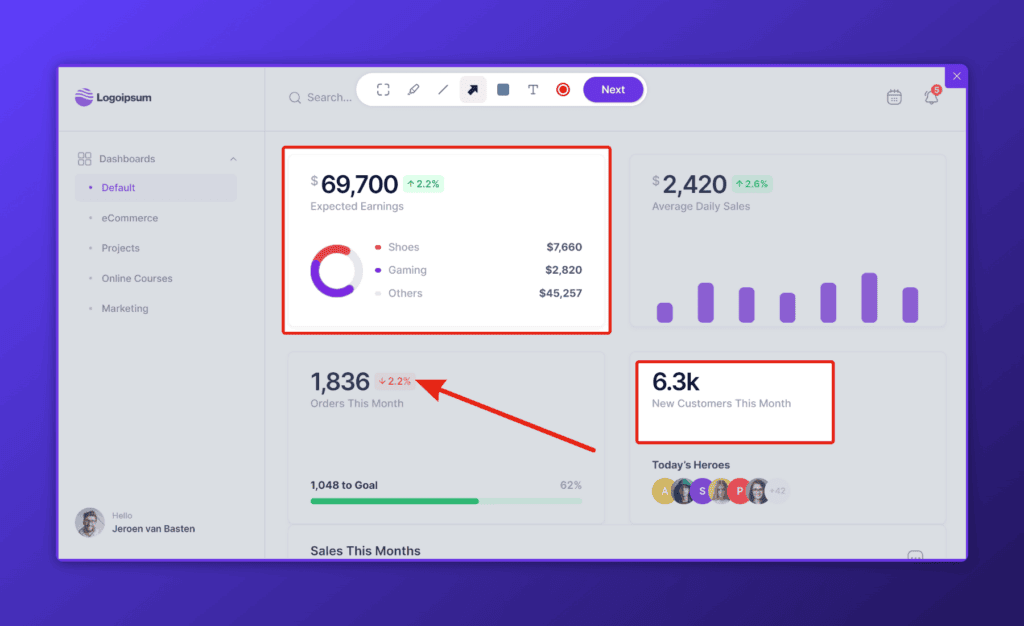
Visual Bug Reports with Screenshots and Annotations
Userback excels in capturing detailed visual feedback. When a bug is reported, users can include annotated screenshots, highlighting specific areas of concern. This visual component ensures that developers have precise context for the issue, reducing misunderstandings and speeding up the resolution process.
Real-time Collaboration and Feedback
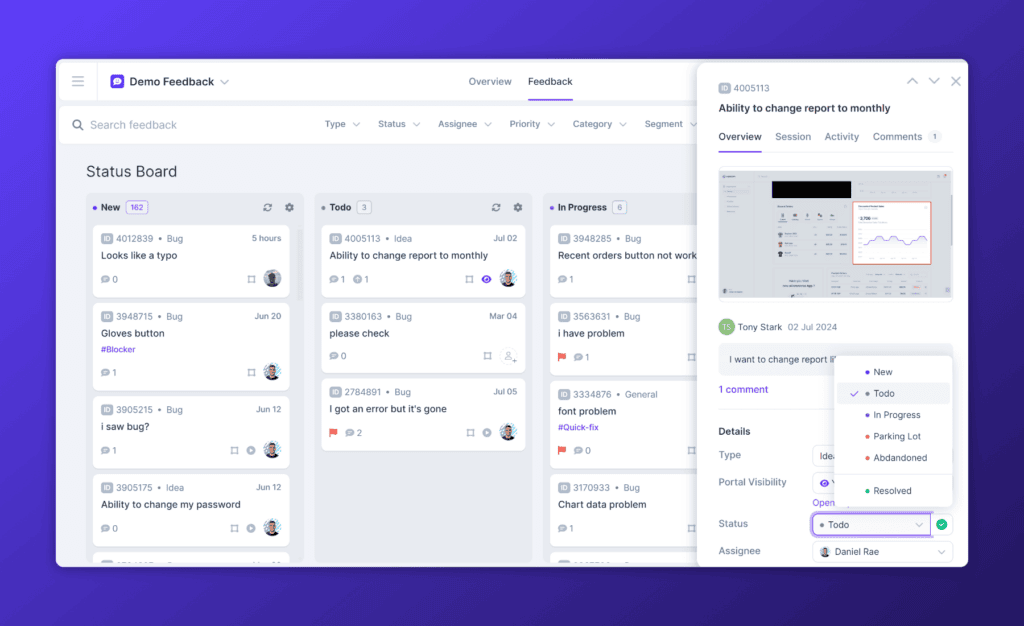
The platform’s real-time collaboration capabilities make it easy for team members to communicate and fix bugs efficiently. Developers, testers, and project managers can discuss issues directly within the tool, ensuring that everyone stays on the same page and that feedback is promptly acted upon.
Integration with Popular Tools
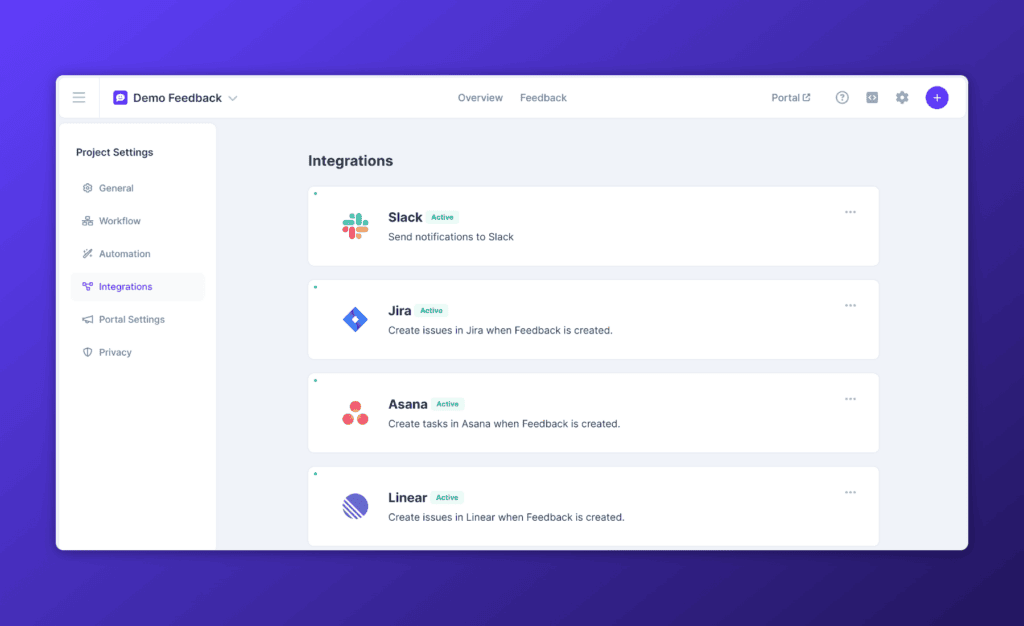
Userback’s seamless integration with widely-used project management and collaboration tools such as Jira, Trello, and Slack allows teams to incorporate bug reports and user feedback effortlessly into their existing workflows. This cohesive integration helps maintain a fluid and uninterrupted development process, ensuring that bug tracking and task management are aligned.
Customizable Workflows
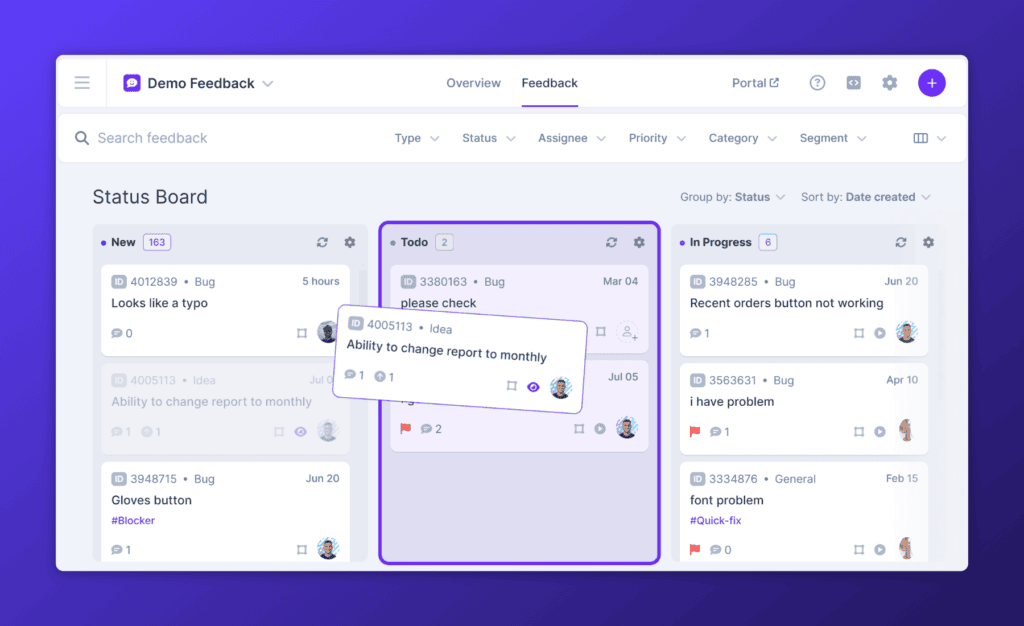
Understanding that every development team has unique needs, Userback offers customizable workflows for fast and efficient bug resolution. Teams can tailor the bug tracking process to fit their specific requirements, ensuring that the tool supports and enhances their productivity rather than dictating how they should work.
Best For:
Userback is best for developers and product managers seeking a comprehensive and user-friendly bug tracking solution, with visual feedback software that integrates seamlessly with their website and software development projects.
Start now with Userback
Get started with a 14-day free trial.
02. Jira
Jira is one of the most popular bug tracking tools used by agile teams worldwide. It offers robust issue tracking and task management capabilities, and is a powerful tool for bug tracking.
Key Features:
- Agile project management
- Customizable workflows
- Advanced reporting and analytics
- Integration with over 3,000 apps
- Automation rules
Best For:
Agile teams looking for a highly customizable and feature-rich bug tracking and project management tool.
03. Bugzilla
Bugzilla is free and one of the best open source bug tracking software and management tools that is highly customizable and efficient for large projects.
Key Features:
- Custom workflows and fields
- Advanced search capabilities
- Robust reporting and charts
- Email notifications
- Issue tracking and project management
Best For:
Large product teams requiring a highly customizable and efficient open source bug tracking tool.
04. Trello
Trello, known for it’s kanban board interface, also doubles as a basic bug tracking tool with its flexible card and board system.
Key Features:
- Visual task management
- Customizable boards and cards
- Integration with numerous apps
- Real-time collaboration
- Automation with Butler
Best For:
Teams needing a simple, visual task and bug management system that is easy to set up and highly customizable.
05. Redmine
Redmine is an open-source project management system that includes bug tracking capabilities. It’s highly customizable and supports multiple projects.
Key Features:
- Multi-project support
- Customizable bug tracking
- Gantt charts and calendars
- Time tracking
- SCM integration
Best For:
Teams that require an open-source project management and bug tracking tool with extensive customization options and support for multiple projects.
06. YouTrack
YouTrack by JetBrains is a powerful issue tracker designed for development teams. It supports agile project management and is very customizable as a bug tracker.
Key Features:
- Agile boards and backlog management
- Custom workflows and fields
- Advanced search and filtering
- Time logging and reporting
- Integration with JetBrains IDEs
Best For:
Development teams needing a powerful and customizable issue tracker that integrates well with JetBrains IDEs.
07. MantisBT
MantisBT is an open-source bug tracking system that is simple to use and highly customizable.
Key Features:
- Email notifications
- Custom fields
- Time monitoring
- Plugin support
- Integration with source control systems
Best For:
Teams looking for a simple, user-friendly, and highly customizable open-source bug tracking system.
08. Zoho BugTracker
Zoho BugTracker is a part of Zoho’s suite of project management tools. It offers robust bug tracking and reporting features.
Key Features:
- Customizable workflows
- Automated reminders
- Time logging
- Detailed reporting
- Integration with other Zoho apps
Best For:
Teams needing a robust bug tracking and reporting tool that integrates seamlessly with other Zoho apps, while offering extensive customization options within a cohesive project management suite.
09. Monday.com
Monday.com is a versatile work operating system that can be used for bug tracking. It offers a highly visual and customizable interface.
Key Features:
- Customizable dashboards and views
- Real-time collaboration
- Automation and integrations
- Time tracking
- Visual reporting
Best For:
Organizations looking for a versatile and visually engaging work operating system that seamlessly integrates bug tracking with other project management and collaboration features.
10. Wrike
Wrike is a comprehensive project management system with robust bug tracking features. It’s designed to improve visibility and collaboration among teams.
Key Features:
- Customizable workflows
- Real-time updates and collaboration
- Time tracking and resource management
- Advanced reporting and analytics
- Integration with popular tools
Best For:
Teams seeking a comprehensive project management software that helps with robust issue and defect tracking and advanced collaboration features.
How to Perform Effective Bug Tracking with Userback
Userback simplifies the bug tracking process with its intuitive and efficient interface. Here’s how you can get started:
1. Sign Up and Set Up Your Project:
- Create a Userback account set up your project.
- Customize your project settings according to your workflow.
2. Collect Feedback and Bug Reports:
- Use the visual feedback tool to collect detailed bug reports with screenshots, annotations, and comments.
3. Integrate with Other Tools:
- Connect Userback with tools like Jira, Trello, or Slack to streamline your workflow.
4. Collaborate in Real-Time:
- Use the real-time collaboration features to discuss and resolve issues quickly.
5. Track Progress and Resolve Issues:
- Monitor the status of reported bugs and ensure timely resolution.
By leveraging Userback as your bug tracking tool, your team can quickly understand and resolve bugs to improve the overall quality of your software projects.